What you can see
The Dashboard is the home screen. The eyebrow shows your scope, such as Platform admin or your venue name. Snapshot counts venues, vendors, and menu items you can manage. Quick actions jump to the same tasks as the sidebar.
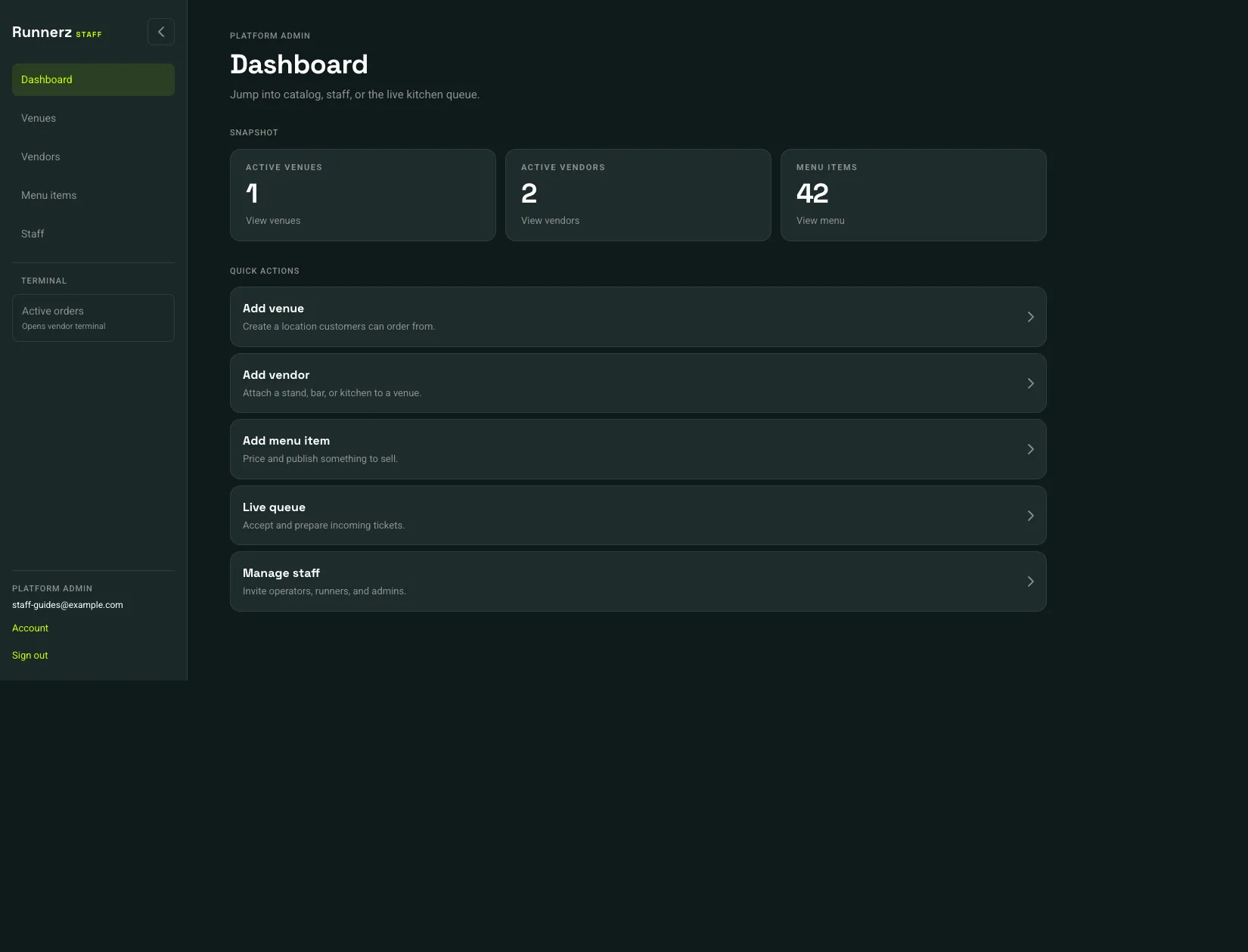 Staff navigation: 1Active orders opens the terminal: 2Quick actions: 3
- Staff navigation
- Active orders opens the terminal
- Quick actions
| Role | Admin portal | Terminal | Typical work |
|---|---|---|---|
| Platform admin | Yes | Yes | Venues, every vendor, staff invitations, payments |
| Venue manager | Yes | Yes, for that venue | Vendors, menu, venue payments, runner invites |
| Vendor manager | Yes | Yes, for that vendor | Menu, vendor settings, vendor payments |
| Vendor operator | No | Yes | Live queue, handoff, pause, item availability, refund |
| Venue runner | No | No | Assigned runs in the runner app |
Vendor managers do not see Venues or Staff. Add venue and Manage staff appear only for a platform admin. Add vendor appears for a platform admin or a venue manager.
Account and Sign out sit at the bottom of the sidebar. On a phone, the same destinations are the bottom navigation.